Hi there, I’m currently on version 0.78.1 (August 2025). Noticed the attached error when importing transaction using IBKR flex query. Thanks

I believe this is what happens:
- The instrument is configured PP with EUR as currency - the historical prices
- The IBKR data contains a transaction that is done in USD
In PP, any transaction related to an instrument must include the conversion of the transaction currency (here USD) to the currency in which the instrument is traded (here configured to be EUR). Because this data is not available in IBKR, the automatic import fails.
What are options you can do?
- If you have not maintained any transaction, consider changing the currency of the instrument to USD. Depending on the provider of historical prices, you also have to configure the source of prices (e.g., have a different ticker for a USD-traded exchange).
- Manually create the transaction by entering the exchange rate.
Unfortunately, the import does not auto-create those transactions. And PP - at this point in time - does require the exchange rate to the instrument currency.
1 Like
Just my 2cts (since I never run in this problem).
I would capture that general error by grabbing the exchange rate from EZB or whatever and use that for the tentative import?
Then print a prominent warning (Arial 20, Bold, red color) in the importer dialog:
“Imported transaction currency does not match instrument currency and no exchange rate is provided in the import file. Actual exchange rate from EZB was used. You can change the exchange rate in the transaction dialog later ….”
Stefan
2 Likes
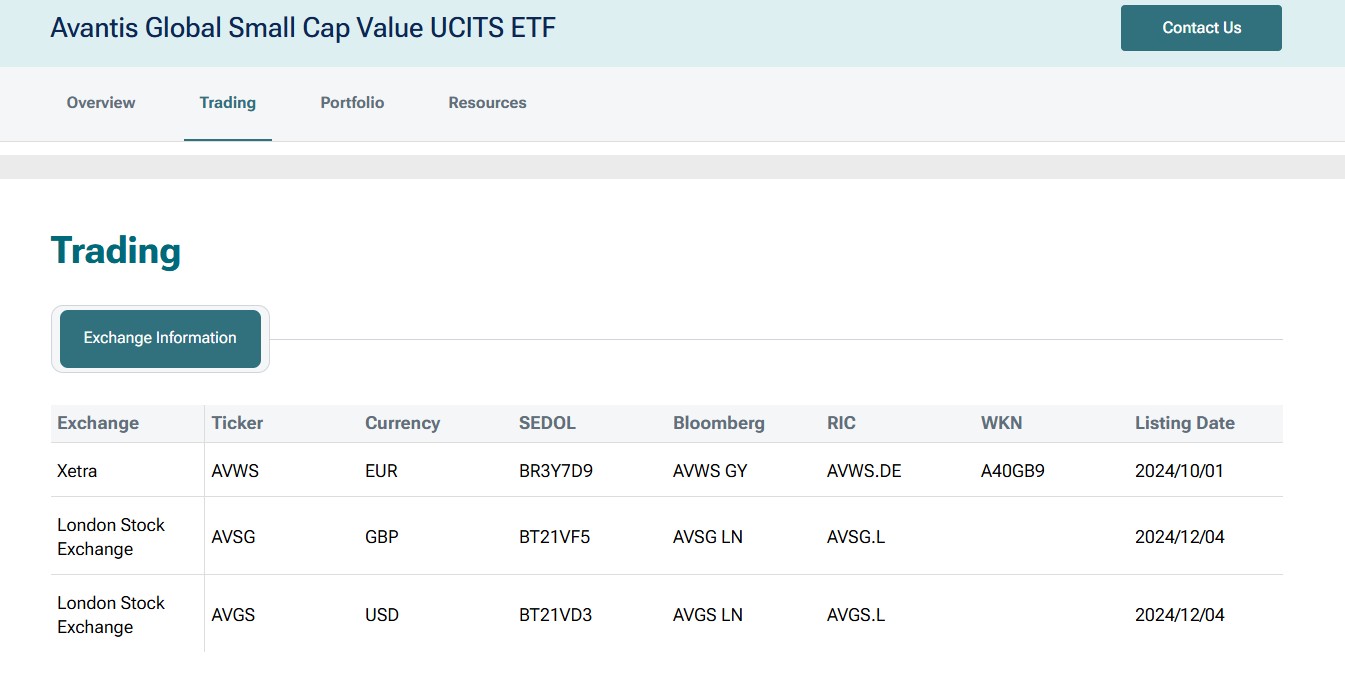
Thanks for your reply. I apologize for not being clearer in my previous description. I previously bought the Avantis Global Small Cap Value UCITS ETF (Ticker: AVWS) which was denominated in EUR. I recently bought the same ETF in USD (Ticker: AVGS).
To solve the import error, I added another ETF (this time in USD) and the import was successful. Thank you all for your assistance!