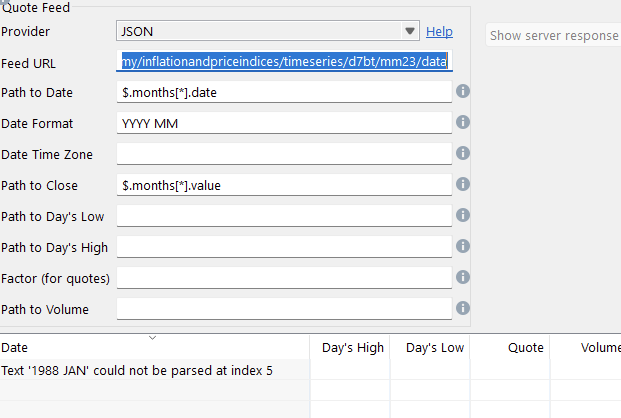
Because of Brexit this data doesn’t appear to be available elsewhere, but I’m struggling to get PP to display it. I’m guessing this may be due to the formatting of the date field, which comprises the Year (as per YYYY) then the first three letters of the month.
I now realise that PP is unable to handle this JSON as its date field has non-standard formatting.
Bit disappointed about this, though it transpires there’s a CSV version of this dataset as per this link - https://www.ons.gov.uk/generator?format=csv&uri=/economy/inflationandpriceindices/timeseries/d7bt/mm23. The monthly data appears to bottom of this and with Excel ONS’s unhelpful date can easily be corrected using =DATE(LEFT(A1,4), MONTH(1 & MID(A1,6,3)), 1). Once that’s done copy the monthly data into a separate csv file, then import into PP
I tested it but forgot then to post about it. Sorry.
The date requires some custom config - it must use the English locale, it must configure to be case insensitive (because of the upper case month), and it must set a default value for the day (because PP expects a date).
In code, that is not too difficult. There is a limit to what to expose as configuration.
I can add it. I am not sure how and when a re-indexing is done. Then you probably have to delete all values and update again.
Wow, thanks @AndreasB. What I suggested would be onerous and possibly prone to mistakes - it would be much better if PP could handle the JSON.
The JSON is maintained by ONS so should reflect all updates as soon as they’re released and comprises indexed CPI data with 2015 permanently set as the base year.
Updated versions of the dataset are made available monthly, typically during the second or third week of each month. Hence if you were able to take this forward, to keep things simple I suggest the ‘15th’ is set as the default value for the day (regardless as to whether this may be a Saturday, Sunday or bank holiday).
Interestingly, I was looking to do the same thing, and was struggling to get past the stupid non standard date format the ONS uses … but as the data is largely static (only one new entry per month)… I simply edited the date in the ONS csv with excel, & imported it into pp. I’ll then just add a new single quote manually in pp each month to keep it up to date.