Braken
September 6, 2025, 11:06am
1
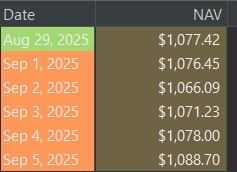
As seen in the attached image, the dates from September are highlighted in orange. It does not show up in the ‘Historical Quotes’ for the security.
I checked the csv file and nothing in the formatting stood out to me:
"Aug 27, 2025","$1,081.55"
"Aug 28, 2025","$1,094.66"
"Aug 29, 2025","$1,077.42"
"Sep 1, 2025","$1,076.45"
"Sep 2, 2025","$1,066.09"
"Sep 3, 2025","$1,071.23"
"Sep 4, 2025","$1,078.00"
"Sep 5, 2025","$1,088.70"
melita
September 6, 2025, 1:47pm
3
When you open Preferences → Presentation → Language , what are your settings for “Language”, “Country”, and “Java Locale”?
Braken
September 6, 2025, 3:59pm
4
Language: automatic
melita
September 6, 2025, 4:32pm
5
If you replace all occurrences of Sep in your CSV file with Sept, the import should work. Apparently the en_SG abbreviation of September is Sept, not Sep.
3 Likes
Braken
September 6, 2025, 4:56pm
6
Thanks for the solution! It is much appreciated
1 Like