Hi all,
is there a way to export all the historical quotes of all securities into a CSV at once?
In other words, without having to select each security individually?
Thanks!
There is no build in feature for this.
The xml could be used for it, but you need a build a pearl script for example.
If I’m not wrong, at the top menu at files exist a export wizard who could might do this.
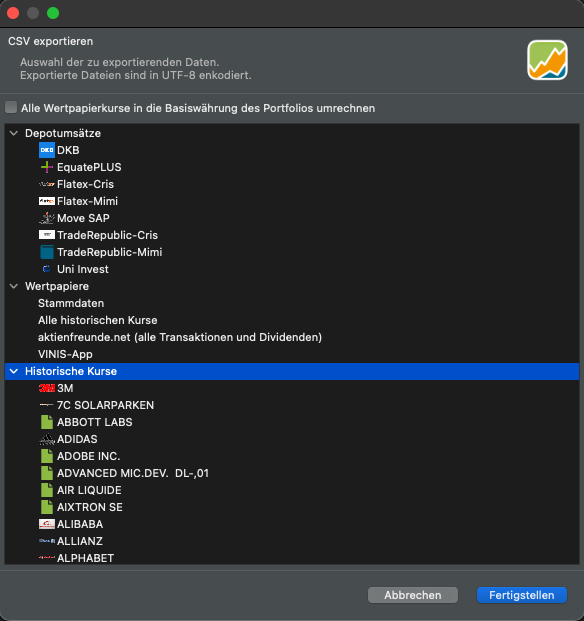
You’re right @Sn1kk3r5 if ‘Historic Quotes’ is selected then the csv that’s generated will only comprise the historical quotes for a single security, which you then need to specify.
If however ‘All historical Quotes’ is instead selected from ‘Securities’ I think the csv file will comprise all the historical quote data for every security, with dates presented in rows and quotes in columns. From what I recall the latter will be referenced by the appropriate ISIN for each security.
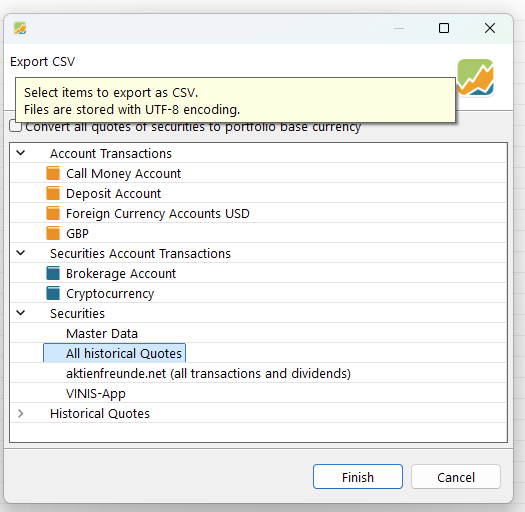
Maybe that’s what you’re looking for @thorho1 
Thank you all guys @Sn1kk3r5 @Rich28 @Rafa !
@Rich28 That’s what i was looking for! I was so focused on the Historical quotes tab that i didn’t notice the “All historical securities” under the Securities section.
In the meantime I’ve also managed to parse all the prices through the xml, but this native way is definitely better! thank you again.