I have configured PP with a number ‘% metrics’ relating to a series of different reporting intervals. Some of these I created some time ago and as such are now redundant - how can I delete them?
yes, the manage option at the bottom of the listed reporting periods
then right click and delete
Thanks for promptly getting back to me @spartok. You’ve jogged my memory — that’s how I was able to do this previously. However, I’ve got PP (ver 0.83.2) installed on a couple of PCs both running Win 11 and strangely neither setup now displays that manage button. I don’t know where its gone!!
I’m not sure whether this is a bug or if PP’s coding has been amended and this ability is now done differently. It would be good to hear if anybody else has ran into this issue or has any pointers.
that’s strange, 'I’m also on windows 11, same PP version and I have no issue, the setting is visible.
Good to to hear you don’t have this issue @spartok - it seems to have affected me though.
I’ve just downloaded and opened the Kommer xml sample file and as is apparent from the pic below, when for instance, I select ‘Change in Price’ from the drop down settings on its Securties View, there’s no manage option at the bottom of the listed reporting periods. Indeed, just ‘New’ is dsiplayed.
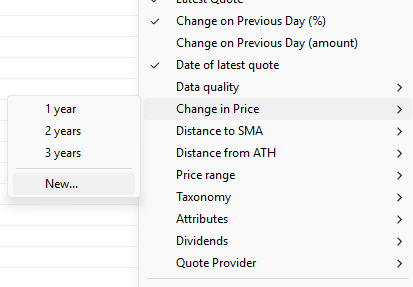
I’m at loss of how to potentially remedy this. Any further thoughts??
These are defaults, therefore they can’t be deleted.
What you see is normal.
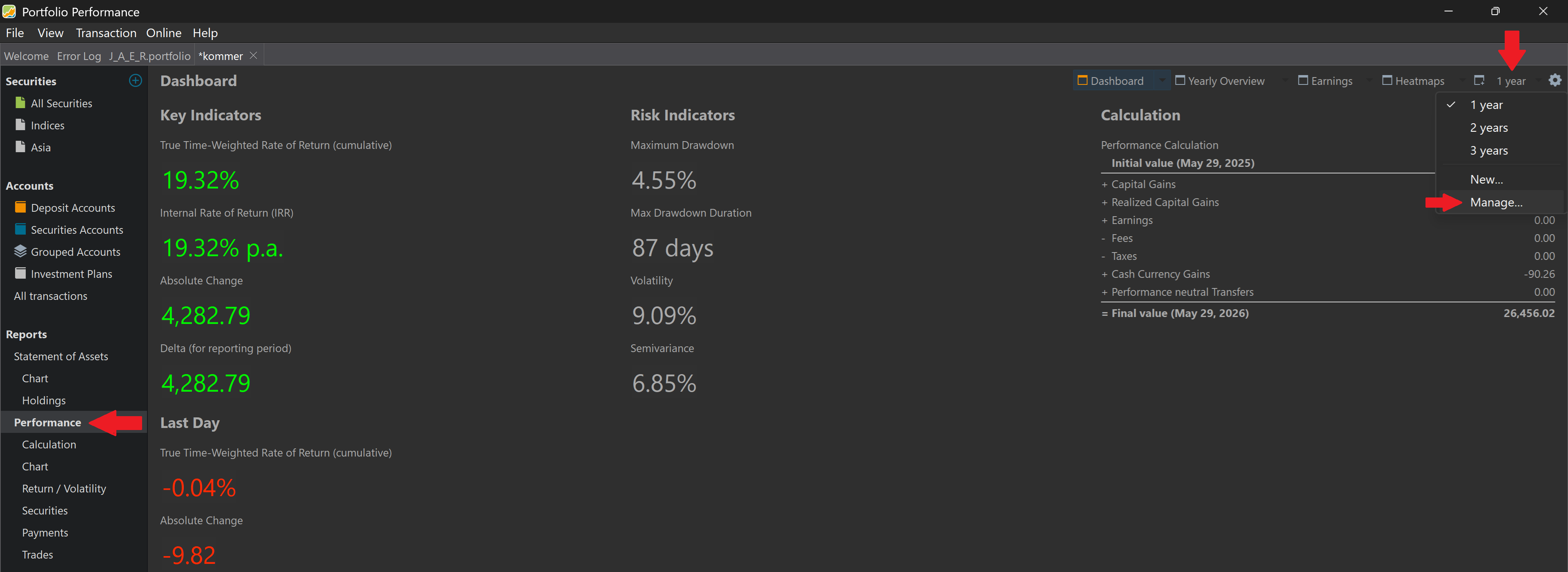
The “Manage” action is available from the Reporting Period field in the top right of some of views, like Dashboard, Statement of Assets Chart etc. Not in the menu of columns. You can edit and delete the default periods.
Thanks for your msg @Rafa I hadn’t realised that default report intervals cannot be deleted - the pic was of an unmodfied version of the Kommer sample file as this issue also seems to affect that.
I’ve now created a new reporting interval and as per the pic below you will note that there’s still no manage option at the bottom of the listed reporting periods.
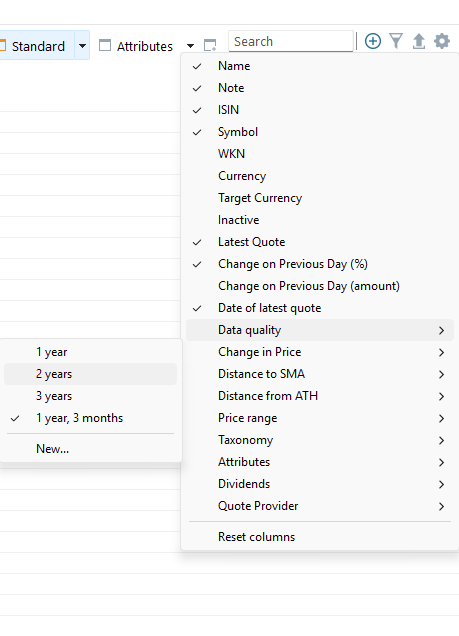
Thanks for your msg as well @Veterini .
I’m struggling to find a ‘Reporting Period’ setting on the top right of any views. I’ve been clicking on the cog situated in that top right corner but for the life of me I can’t locate any option to manage reporting intervals from the menu that appears - refer to the msg/pic I’ve just sent Rafa.

Thanks @Veterini, I really appreciate that but sadly it doesn’t help.
Perhaps I should have been clearer in my inital post. Instead of saying “I have configured PP with a number ‘% metrics’ relating to a series of different reporting intervals…” maybe it would have been better if I had said “I have configured the Securities View and Statement of Assets with a number ‘% metrics’ relating to a series of different reporting intervals”. That’s what I’m trying to manage, hoping to be able to delete some that are now redundant.
The pic that you just provided seems to be of the top right corner of the Performance Calculation view and I know that features a manage filters option, but that filtering relates to the portfolio and reference account(s), so sorry seems to be something different.
Ah ok, so :
If you want to delete some columns of a table, you can right click on the column header in the table and remove it.
I thought you wanted this:
If you want to remove some time option from appearing in the menu, right click on the drop down ‘10years’ from my previous picture, where you will find the ‘Manage’ menu.
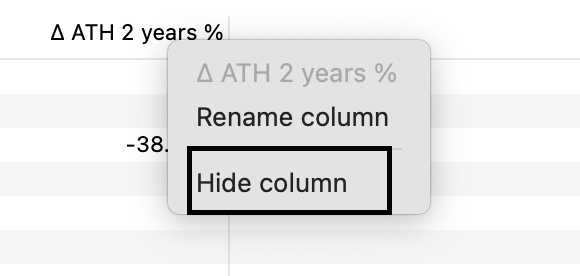
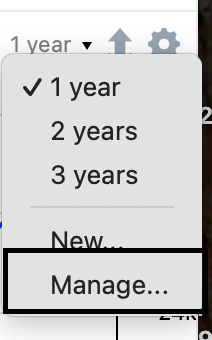

Hi @Veterini, Sorry that I’m just responding to your post now - I’ve been away with no internet access quite remarkably  .
.
Big thanks for trying to help. The issue I’m experiencing relates to your second point, “…Manage Reporting Interval to delete them from being selectable…” For some reason, in my case, that ‘Manage’ button simply isn’t showing up.
I’ve turned to ChatGPT to resolve this - its a bug affecting some Windows users, which I’ve reported as per: Bug Report: Reporting Period “Manage...” UI Missing Despite Persisted Reporting-Period History · Issue #5734 · portfolio-performance/portfolio · GitHub. This also provides a potential workaround to the issue until a fix is implemented.
Are you 200% you are looking at the right location ?
Again :
‘Manage’ will NOT appear in the picture you showed in your third message. This is normal and same for everyone.
‘Manage’ will appear if you use the dropdown in the toolbar of some views. Not the cog, the dropdown few icons next to it. In my very first picture there is a large '10 year’s with an arrow..
Did you find this dropdown ?
If yes, please provide of screenshot showing ‘Manage’ is not appearing. Until them, there is no bug.
I’m somewhat irritated by your response @Veterini. I’ve really tried to provide a clear indication of the issue I’m experiencing and you’re now challenging that - did you even bother to read the bug report I submitted??
Here’s the screenshot you’ve asked for - NOT showing ‘Manage’!!

Hi @J_A_E_R ,
Yes, perhaps there is a misunderstanding  !! 9 days ago I informed in a post:-
“… I have configured the Securities View and Statement of Assets with a number ‘% metrics’ relating to a series of different reporting intervals. That’s what I’m trying to manage, hoping to be able to delete some that are now redundant.”
Hence this issue only concerns the Securities and Statement of Assets views, both of which feature the ability to create custom reporting intervals. However, in my case, neither of these views provide a “manage” option so its simply impossible to delete any custom reporting intervals which may have been created.
This should be evident from the screenshot of the drop-down of my Securities view that I just sent Veterini, which as you will note only features “New…” at the very bottom, “Manage..” isn’t there.
Consequently, potentially I could create an infinite number of different reporting intervals for the Securities and Statement of Assets views but have no ability to delete any of these.
And just to clarify this issue only concerns these two views - the “Manage..” option is visible on my Performance/Dashboard view
Yes, that`s totally clear, in this view there is no “manage” option.
But you still you can manage them in the view from my screenshot.
Thanks for pointing this out @J_A_E_R . I wasn’t aware that reporting periods could be managed from the Performance/Dashboard view, and that solves the immediate problem.
In hindsight, I think what caught me out was that the reporting periods had originally been created from the Securities and Statement of Assets views, so that’s where I naturally expected to find any related management functionality. It never occurred to me to look in Dashboard for that purpose.
Having used ChatGPT to investigate the XML and various configuration folders, I was beginning to suspect a bug, so it’s good to know that the functionality does in fact exist.
That said, I wonder whether the discoverability of this feature could be improved. At least for me, it wasn’t obvious that reporting periods created in one view would need to be managed from a completely different area of the application. Perhaps the documentation already covers this and I simply missed it, but if not, a small note in the relevant help pages might save others from going down the same rabbit hole.
In any case, thanks again for the clarification, and thanks to the PP developers and forum contributors for maintaining such a useful application and support resource.