Hi, I’m trying to build my portfolio into PP and stumbled across multiple videos/forum posts where people use company logos to replace the default green icon that securities use.
Adding works but for some reason it’s not replacing the icon itself. I’ve tried multiple image formats, creating a new PP file and reinstalling the software.
I’ve read forum posts where people got it working on W11 but those posts are quite old. Am I doing something wrong or is it a (known) bug?
Did you create a new attribute also called “Logo”?
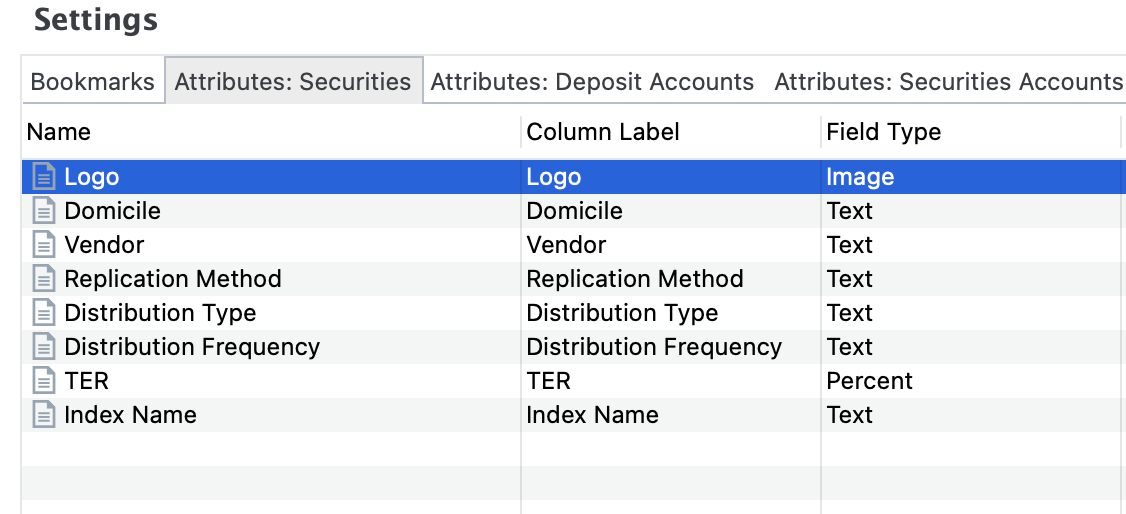
Can you share the screenshot of your “settings” sections for “Attributes: Securities”.
Because the logic is this: There must be an attribute named “Logo” and of type “Image”. And then the first one is picked to use as logo. In a new file, it looks like this.
This solved the issue! It was caused because I was using the software in Dutch so the attribute value was mismatching. Probably a locale translation error worth looking into. Thanks again for the quick reply!

 thanks for the hint. Yes, that property is translated. That does not work. I will think of something.