1 Framework Conditions
Windows 11
Portfolio Performance
Version: 0.81.0 (December 2025)
Platform: win32, x86_64
Java: 21.0.5+11-LTS, Azul Systems, Inc.
2 Steps to Reproduce
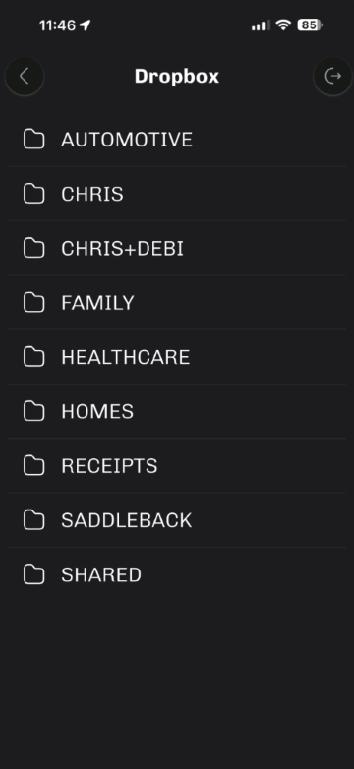
Launch PP on iPhone 16 > Open Portfolio > Dropbox > observe folders shown
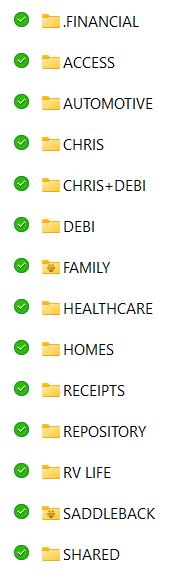
Open Dropbox folder on Windows 11 PC > observe folders shown
See that the iPhone screen is missing a few of the Dropbox folders shown in Windows Explorer
3 Expected Behavior
List of Dropbox folders on the iPhone would be the same as on Windows 11
4 Actual Behavior / Error Pattern
The iPhone screen is missing a few of the Dropbox folders shown in Windows Explorer.
This is a problem because my PP file is in folder named ACCESS but not visible/accessible on iPhone.
5 Your Own Assumptions (Optional)
I’m clueless!
See attached screenshots