Hi, I’m relative new so excuse me if this question is not relevant.
Is it possible to set a stop-loss signal at x % for open positions? If not possible, I believe it would be a very helpful feature to have?
Rgds,
Hi, I’m relative new so excuse me if this question is not relevant.
Is it possible to set a stop-loss signal at x % for open positions? If not possible, I believe it would be a very helpful feature to have?
Rgds,
You can create min max values via security attributes. But only in absolut values not percentage.
As @Sn1kk3r5 already explained, there is a limit-setting but with absolute values, not percentages:
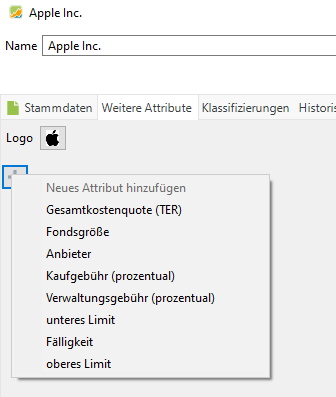
First you have to create these attributes. Go to Settings → Attributes: Securities, click on the plus-symbol and select “Limit-Price”. Give it a name (that appears in the edit-dialog) and a column name.
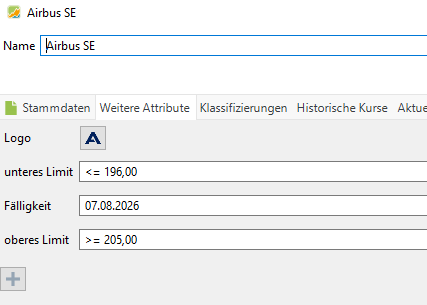
No go to the securities overviews and right-click onto the security in question, go to “More attributes” and select your limit entry (in my case “Lower limit” or “Upper limit”):
Then yon can specify values (different security in my example):
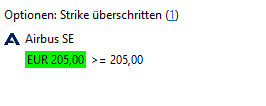
If a limit is exceeded the value will be highlighted:

You can also add a widget to the dashboard that shows all securities with exceeded limits:
Thank you both! I think I got it working! But it is a “static limit” correct? Not moving, as a trailing stop. I’m using Excel to signal me when -x % below peak, since buy. Any way to propose this function for a future version? (Respectfully, for what’s already there  )
)

There is no real use of such a feature since PP doesn’t have realtime quotes.
Stop-loss signal will work with daily quotes just as well…
If you like a half working feature.,yes.
Imagine your PP is closed, how should this work?
Well, unless we are in misunderstanding, it would exactly the same as the min/max values you explained with the only difference that the min limit is dynamic. When you re-open PP, it updates the quotes, takes the highest quote - since opening the position - and compares the set stop-loss percentage.
In Excel I have this working. It feeds me a yellow signal on 8% pull back and a red signal on 10% pull back. Using daily quotes, not real time.
What you’d like to see is a dynamic relative threshold; for this I agree, this would work like a fixed threshold.
A stop loss is a one-time activity based on the above. A trailing stop loss is a dynamic one-time activity based on the above.
Both are actions you maintain on your brokerage account. I understand you’d like to see this in PP as well.
But, imagine… you set a stop loss at 5%, during intraday, stop loss gets triggered, and the security is sold. Later the same day, the quote recovers to be below your 5%. You now open PP after market close. PP has no idea about the intraday drop, but your broker sold the security.
So I assume what you really like to have is a dynamic limit rather than a trailling stop loss.
Of course PP has no idea about the broker actions, everything has to be entered in PP, right? So on you 5% example, yes, if the security has been sold on trigger, you have to close this position in PP. But, not all brokers offer trailing-stop-loss orders. So what I am suggesting is that PP users can set a signal when a position has fallen x % from it’s peak. That’s all