Using AI to analyze a Portfolio Performance XML file — has anyone else tried this?

Hi everyone,

I’ve been using Portfolio Performance for a while now and I find it really useful. That said, at my level, I also find some of the performance reporting a bit hard to read. There are lots of charts, tables and figures, and even if I understand them, I don’t always find the whole thing very intuitive.

So last weekend, mostly out of curiosity, I thought: why not feed the XML to an AI and see what it comes up with? At first it was just for fun. In the end, I spent two sleepless nights on it, tried 3 different AIs, and got a surprisingly decent result: a 24-page report with tables and charts, but above all something that actually explains the portfolio in plain language and tries to analyze its performance.

I used ChatGPT Plus, Perplexity Pro and the free version of Claude. At first all three gave me a first report. Then I started having fun with it: I asked each of them to judge the other two reports.

Perplexity was clearly behind, and it more or less admitted it itself by preferring Claude’s report. GPT didn’t react very gracefully to Perplexity’s criticism, but it did recognize some strengths in Claude’s work. Claude, characteristically, thought the three approaches were different but complementary. And in the end Perplexity basically gave up and admitted GPT’s version was stronger.

In practice, the roles ended up splitting quite naturally: GPT did the actual drafting, Claude acted more like an auditor, and Perplexity gave its opinion on both. I ended up with 6 versions, a summary, and a technical annex that I’m still not sure I really needed. So yes, a lot of work for a very small portfolio. But intellectually, it was really interesting.

To give a more concrete idea of the result, here are two anonymized extracts.

First, the structured summary table :
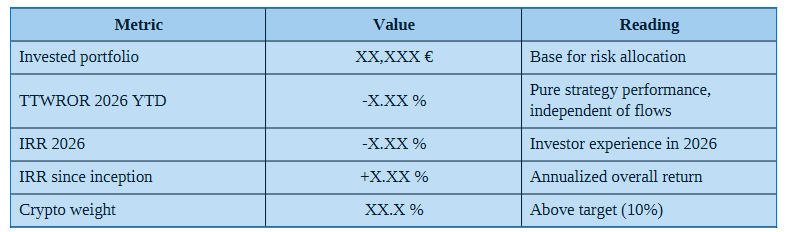
Central diagnosis — The actual portfolio currently looks like roughly XX% World / XX% semiconductors / XX% small caps / XX% crypto / XX% French euro funds, against a target of 55/15/10/10/10. The real issue is not changing the strategy, but making sure every new euro finally serves the strategy that was already defined.

Then the plain-language summary :

Where does the portfolio stand?

The portfolio is broadly consistent with a dynamic long-term strategy. However, the actual allocation is not yet the one being targeted: the core position is still too small, while the crypto sleeve still weighs too much.

What is working

The World ETF is doing its job well as a diversified foundation. The semiconductor conviction is coherent and performing well, even if it still remains too small within the overall portfolio.

What is a problem

The early 2026 decline mainly comes from the crypto sleeve. So it is not the core strategy that is being called into question, but its actual structure. In short: the portfolio is not badly designed, it is still badly balanced.

What needs to happen

Stop adding to crypto while it remains above target. Direct new contributions first to the World ETF, then to semiconductors, then to small caps. Less tactical tinkering, more consistent DCA.

I haven’t really seen any thread here — or anywhere in English, French or German — going into this subject in any real depth with Portfolio Performance. So I was wondering: has anyone here tried something similar? And if yes, would there be any interest in exchanging prompts and methods to improve this kind of thing, like Panini cards lol?

Or maybe it has no real interest at all and I’m the only one who found it interesting :wink:

I actually was just thinking about doing this, and came to the forum and saw your post here. I’m probably not gonna bother doing it myself, as I was only thinking about doing it in the context of setting up a portfolio for real returns, but learned that simply doesn’t work for PP, as unless taxes are associated with a specific security, it isn’t counted for performance purposes (at least that’s what I read). But it isn’t a bad idea if you want to get specific answers to your questions, sure.

Hi there,

I had the same idea and did some research about that.

I started first with the parsing of the raw xml. But results weren’t great.

I found an older Python Library that parses the PP xml files. So based on this I built an MCP that exposes a server with several tools that can AI easily use. Loads of bugfixes included.

You just need to expose the MCP Server for your AI Tool/Model of choice. (personally for private stuff i use opencode)

leneffets/pyfolio-performance-mcp: Python library + MCP server to read Portfolio Performance XML files. Access your portfolio data via AI agents for investment analysis.

With that exposed to AI, I was able to get quite amazing results with a comprehensive prompt that includes:

  • Whats do you think is the strategy
  • Structure
  • Overlap
  • Risk
  • Performance Overview
  • Recommendations
  • Forecast based on my personal goals
  • Evaluation of current market
  • Score of complexity and robustness of depots/accounts
  • Longterm Endurance for my strategy
  • personal information and goals

Actually like an experienced investment advisor.

Feel free to try it and share results or improvements.

Based on your technical background, AI may help to get this up and running. :wink:

Cheers,

Hey all,

I’ve been using Portfolio Performance for years to track my own investments plus a couple of family portfolios, and I recently built a custom MCP (Model Context Protocol) server — pp-mcp — that lets Claude (Anthropic’s AI assistant) query PP data directly. I did the whole thing together with Claude Code, which made it a pretty fast and honestly kind of fun process.

What it does

The server exposes about 20 read-only functions that let Claude pull structured data straight out of a .portfolio file, e.g.:

  • Holdings valuations and historical value charts
  • Asset allocation by taxonomy (asset class, region, sector, whatever you’ve set up)
  • Realized/unrealized gains
  • Transaction summaries and filtered transaction lists
  • Security master data, price history, and price feed configs
  • Multiple portfolio files as separate “sources” (I use this to track my own portfolio alongside my wife’s and mother-in-law’s)

There’s also a refresh_prices function that pulls in newer quotes from a configured price feed and holds them in memory for the session, without ever writing back to the .portfolio file.

Not just for chatting with Claude

One thing worth mentioning: since it’s a standard MCP server, it’s not limited to conversational use in Claude or others KI. It can just as easily be called from scripts — I’ve hooked it into some of my own automation for things like syncing ETF classification data, so the same read functions Claude uses interactively can also be driven programmatically without a chat interface in the loop at all.

Why

I wanted to ask natural-language questions about my portfolios — “what’s my unrealized gain on X”, “how has my allocation shifted this year”, “which positions are inactive” — without opening PP and clicking through several views each time. Since the MCP server is read-only, there’s no risk of it ever touching the actual file.

Building it with Claude Code

I used Claude Code to scaffold and iterate on the server, and it was genuinely useful for quickly wiring up the PP data model (accounts, portfolios, securities, transactions, taxonomies) into clean, well-typed tool endpoints. Being able to describe a function (“give me realized gains per security in a date range”) and get a working implementation in a couple of iterations sped things up a lot compared to writing all the PP XML/domain-model parsing by hand.

Happy to answer questions if anyone’s interested in doing something similar with their own PP data!

Hi all,
I have made the repository public. You can find it at GitHub - Nokke32/pp-mcp · GitHub

Please get in touch if you have any questions.’

Thanks, Nokke

Thanks. I will try. Do you plan for adapting other AI models? I mainly use ChatGPT …

Hi nono56!
ChatGPT Desktop (Plus/Pro/Business/Enterprise) actually supports custom remote MCP servers too, so pp-mcp should work there as well.

Here’s how to set it up:

  1. Open ChatGPT Desktop → Settings
  2. Go to Apps (or Connectors, depending on your version)
  3. Select Add Custom App (or Add MCP Server)
  4. Enter:
    • Name: PP-MCP
    • Server URL: https://mcp.example.com/mcp (use your own server URL)
    • Authentication: Bearer Token
    • Token: your personal access token
  5. Save and test the connection — if it succeeds, the pp-mcp tools should show up as available in ChatGPT.

A couple of notes:

  • Each user needs their own personal access token
  • Keep your token private, don’t share it
  • Menu labels can vary slightly between ChatGPT Desktop versions, but the required info (server URL + Bearer token) stays the same
  • No manual JSON config needed — it’s all done through the UI

Let me know if it works for you!

Hi @Nokke,

Thanks for this, am giving it a go :slight_smile:

The part of the design I’m not so keen on: this is a server that runs continually, and the project recommends Docker as well. Both of those aspects are bad for system performance, and if we take this approach with everything where we want to connect an AI, it would become quite an overhead!

MCP has some neat features (sampling, elicitation, etc), but I don’t think any of them are used here. Given that, I’d consider a skill + command-line utility, but others may disagree. Would also want to see if the background server improves response times.

Also, a little security feedback: MCP_SERVER_HOST is 0.0.0.0 by default. Even though the server auths, I think best practice would be 127.0.0.1 here?

Still, greatly appreciate that you made and shared this!

… submitted a couple of PRs, adding the option to run as stdio, and documentation for uv instead of Docker.

On that basis, the project is working for me so far – thanks!

Hi georgemac-labs!

Thanks a lot for the detailed and constructive feedback — really appreciate you taking the time to think it through, not just try it out!

Just to add a bit of context on my own setup, since it might explain one use case for the always-on server approach:

  • Portfolio Performance itself runs on my Mac
  • The .portfolio files are automatically synced to my Synology NAS
  • The NAS runs Docker, including the pp-mcp server
  • The pp-mcp server accesses the synced .portfolio files directly on the NAS

This setup let me access my PP data from anywhere, not just from the machine where PP is installed

So in my case, the continually-running server isn’t just an AI-connection overhead — it’s also what gives me remote/always-available access to the portfolio data in the first place. That said, I fully get the performance concern, and the skill + CLI idea sounds worth exploring for setups where the data is only ever accessed locally.

Good catch on MCP_SERVER_HOST defaulting to 0.0.0.0 — agreed that 127.0.0.1 should be the safer default, especially since not everyone will realize they need to lock that down themselves. I’ll take a look at that.

Thanks again for trying it out and for the thoughtful feedback!

Makes sense. That’s a very nice model to work on – having access to all your stuff, AI enabled, from wherever you are. Something I’ve thought about and may come back to.

I’ve set it up in a simpler way, as most people probably will – just running locally on my laptop. PRs I’ve submitted provide a variation I think is more suited for that, although I haven’t checked the performance consequences of repeated cold starts vs. resident server.

Thanks to some contributions from georgemac-labs, pp-mcp now supports running over stdio in addition to streamable-http/sse. This means MCP clients that launch servers as a local subprocess (e.g. Claude Desktop) can now use pp-mcp directly, without a resident HTTP server or a mcp-remote bridge. Both a plain python -m src.main + PYTHONPATH setup and a uv --directory … run --no-project setup are documented as options.

Also fixed based on review feedback: MCP_SERVER_HOST now defaults to 127.0.0.1 instead of 0.0.0.0, so a local/non-Docker instance no longer listens on all network interfaces by default. Docker deployments are unaffected — docker-compose.yml/docker-compose.dev.yml explicitly set MCP_SERVER_HOST=0.0.0.0, which is required for the container’s port mapping to work.

Full details in the READMEs (EN/DE). Thanks again to georgemac-labs for the contributions!