Hello friends,
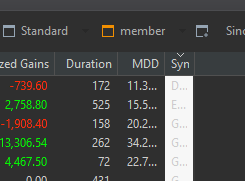
There is a minor issue when using Dark Theme.
Under Reports > Securities
I am using PP with latest update:
Keep up the good work.
PS: Maybe due to page translation, cannot select category of post when creating topic. Apologies.
I note the warning after changing theme [V0.56.2] A restart is required for the theme to take full effect.
Unfortunately after doing a windows 10 OS Restart, the same issue remains.
@charles03 : This is a known bug:
opened 12:05PM - 10 Nov 20 UTC
bug
**Describe the bug**
If you run PortfolioPerformance in dark mode and you have … several tab pages defined for the view "Berichte/Vermögensaufstellung", when switching between the tabpages the column to be used for sorting will be shown bright white (not dark mode style?).
**To Reproduce**
Steps to reproduce the behavior:
1. Start PortfolioPerformance
2. Click "Berichte/Vermögensaufstellung"
3. Switch between defined tabpages
4. Sort column will be shown white
**Expected behavior**
Columns should never be shown in white while in dark mode.
**Screenshots**

**Desktop (please complete the following information):**
- OS: Windows 10
- PP Version 0.49.2
This issue was also reported in the german section (just as link between both topics):
Hallo,
seit einigen PP-Versionen habe ich im Dark Modus ein Darstellungsproblem, wenn ich eine Ansicht wechsele.
Konkret: Tabellen in “Berichte Vermögensaufstellung” oder “Berichte Performance Wertpapiere”;
Ablauf: Mindestens jeweils 2 Ansichten, dort jeweils 1 Spalte markieren/selektieren, dann zwischen den 2 oder 3 Ansichten hin/herspringen
Daraufhin sind die ursprünglich selektieren Spalten auf einmal hell erleuchtet (Hintergrund) und kaum noch lesbar.
Das Ganz ist vorübergehend heilbar,…
Thanks, it seems to be from the underlying library as its logged in